Many users of modern gadgets frequently encounter the problem of their smartphone's battery draining quickly. This can occur for a number of reasons, which will be discussed in today's article.
- 5 Reasons Why Your Phone Battery Drains Quickly
- How can I find out which app is draining my battery?
- Battery charge monitoring app for Android
- Battery wear
- AccuBattery app for checking battery wear
- About using the AccuBattery app
- How to check battery wear using AccuBattery?
- Working Internet
- Low battery capacity
- Low quality battery
- How to save battery life on Android?
- Which smartphone has the longest battery life?
- Battery indicator
- How to charge a new smartphone battery?
- Instructions
- How to charge a smartphone with an AA battery?
- A video on how to charge a smartphone with a battery
- The smartphone turns off when the battery is fully charged.
- What is the battery life of a smartphone?
5 Reasons Why Your Phone Battery Drains Quickly
- Programs that eat up battery power.
- Battery wear on Android.
- Working internet.
- Small capacitybattery.
- Poor quality battery.
How can I find out which app is draining my battery?
The menu may differ on each phone, but the basic idea is the same. Find the battery button, go to those settings, and see which apps are using the most power.
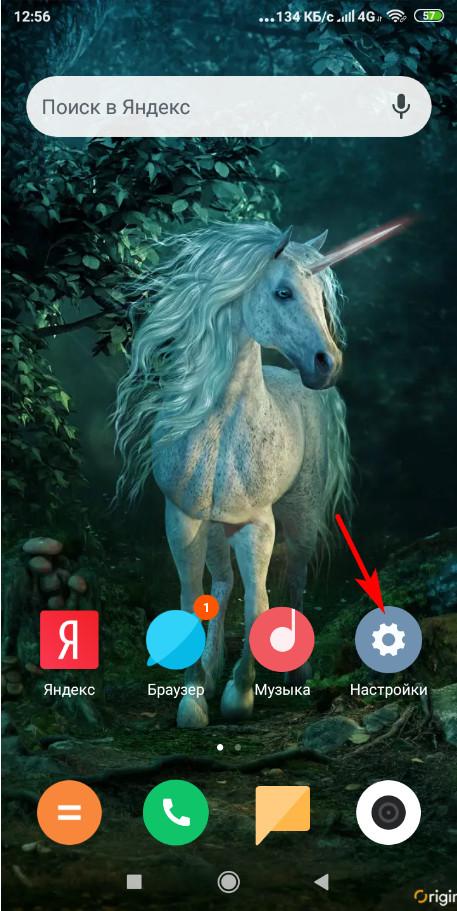
Let's look at this process below using the Redmi 6 A as an example.
Go to settings and click on power and performance.
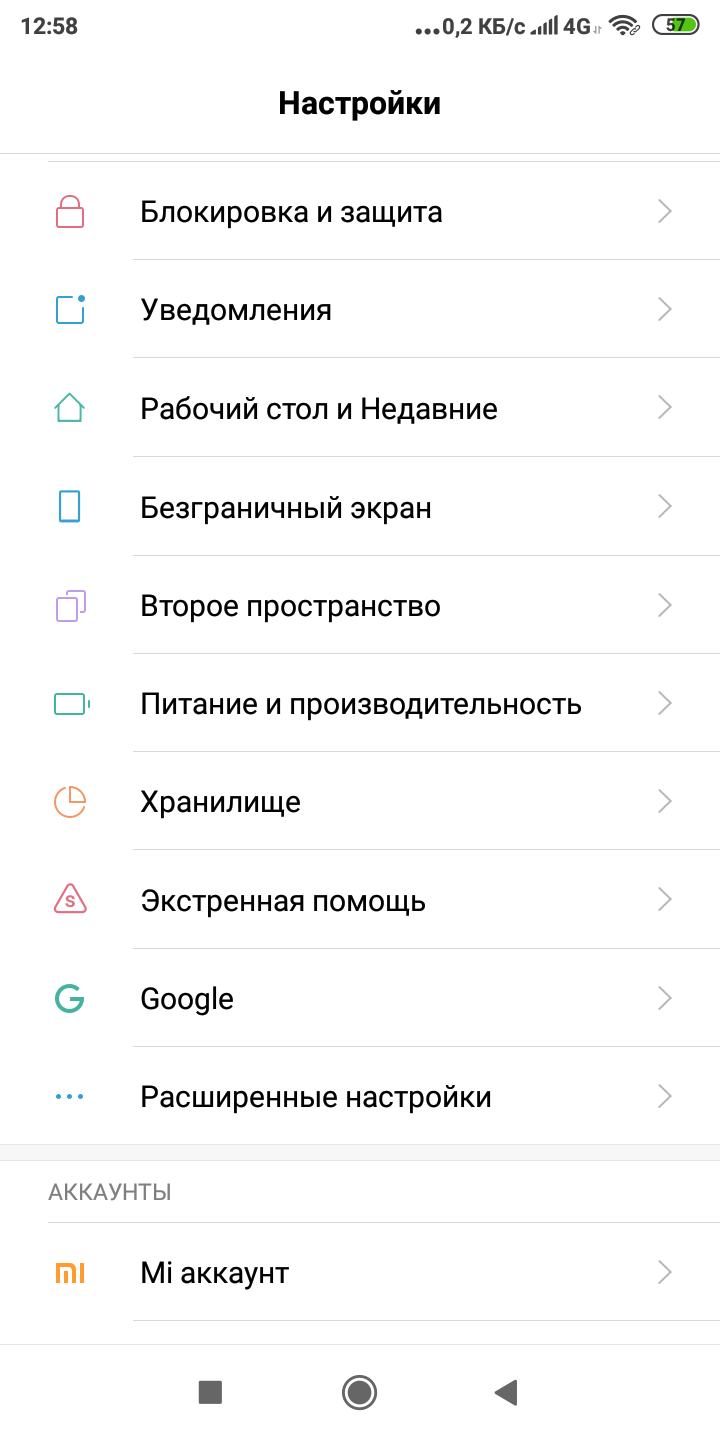
Next, we dive into the "Power Usage" section, and we'll see two submenus: "Apps" and "Device." We'll look at these two sections and identify which apps are draining our battery.
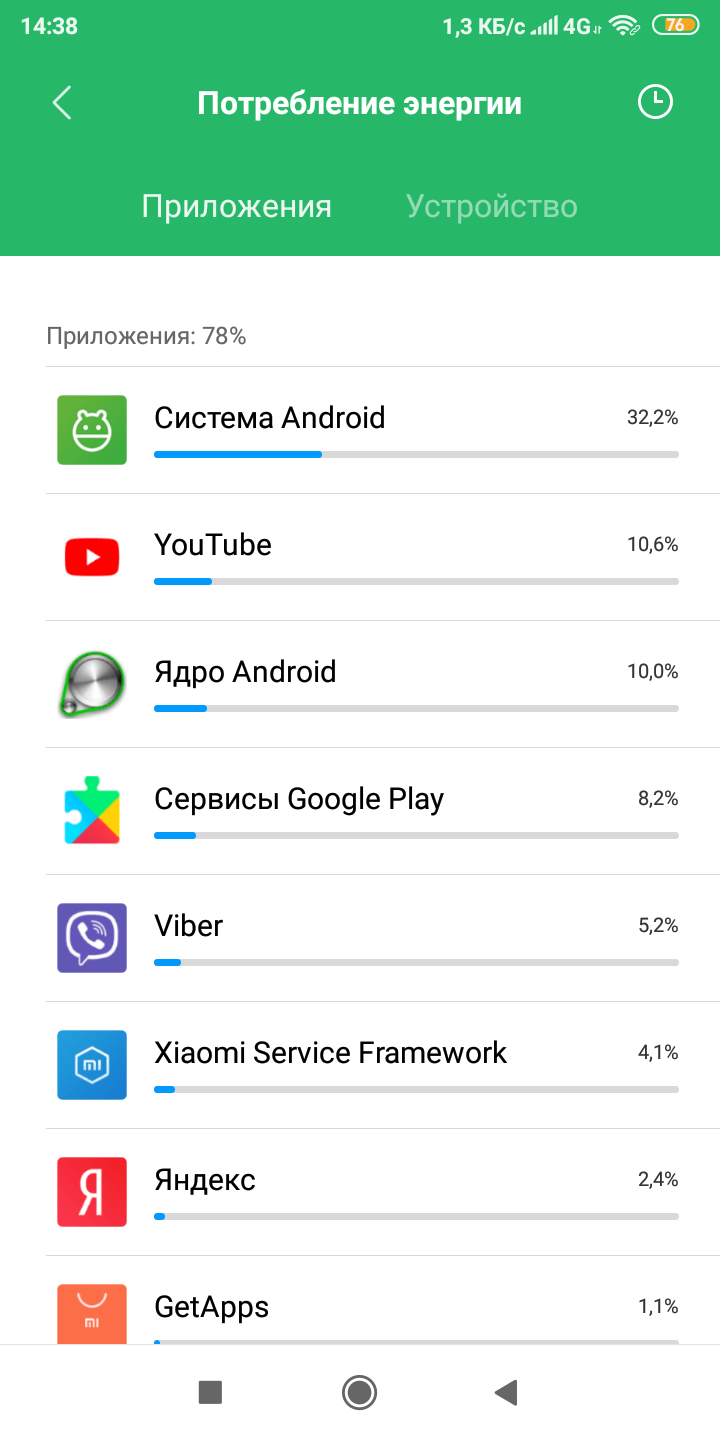
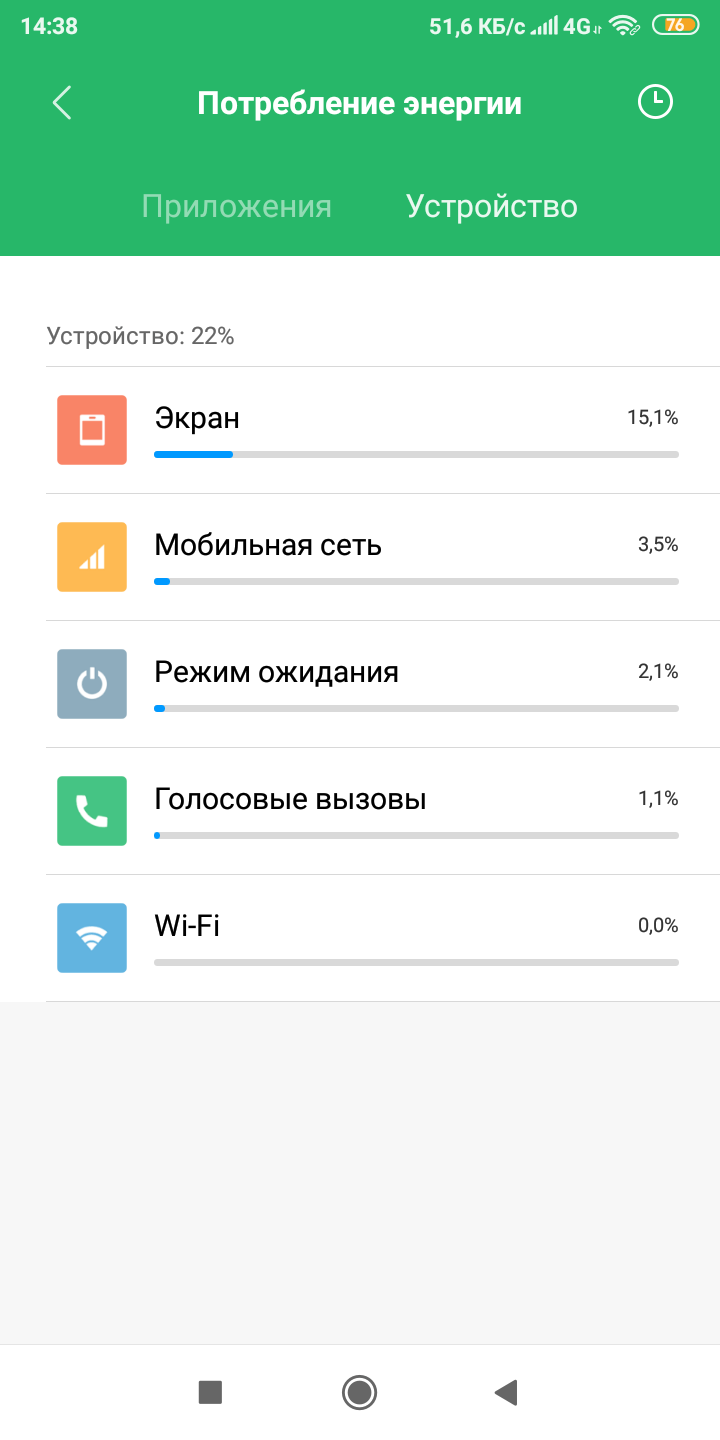
This allows us to deduce where the battery was spent. Android itself is a huge battery drainer, as you can see from the screenshot, consuming a whopping 32.2%. The screen also consumes 15.1%.
Other apps show consumption at low percentages. If you use a particular app for a long time, the standard menu will naturally show that it's the one consuming the most battery. Therefore, if you want to save battery, avoid spending too much time on Viber, YouTube, social media, and other apps.
Battery charge monitoring app for Android
In fact, there are a large number of similar apps available today. All of them are designed to preserve your smartphone's battery life. However, you should think twice before installing this software. Your Android phone may already have a battery monitoring app pre-installed, so it's worth checking.
Below is a list of battery charge controller applications.
- AccuBatteru.
- Super Battery.
- Battery Life.
- Max Battery.
- Battery.
- Battery.
- Nova Battery Tester
- Battery HD Pro
- Power Battery
- Battery Alarm
- GSam Battery Monitor
- 3C Battery Monitor Widget
- Battery Doctor
- Ampere
By installing one of these utilities, you'll no longer have to wonder what to do if your Android battery drains quickly.
Here's what these programs can do:
- To determine capacityphone batteries.
- Show voltage.
- Provides data on current strength.
- Provides information about the current used for charging.
- Optimize energy consumption.
- They show the battery type by chemistry (Li-ion, Li-poly, etc.).
- Some of them provide data on which application consumes the most energy.
In fact, this is not a complete list; each program has its own additions.
Battery wear
The battery's wear level determines how long it can hold a charge. Determining the percentage of wear on your smartphone battery can be quite challenging. This is because there are virtually no Android apps that display this metric. However, similar apps exist for iPhone and iOS.
To determine whether your battery has truly reached critical wear, you can use indirect signs. Here's a list of them:
- The Android system shows the battery charge incorrectly.
- The battery indicators are jumping.
- Battery life has noticeably decreased.
- Charging does not go completely.
- The battery is getting very hot.
- The battery takes a long time to charge.
- Progressive reduction in capacity.
Therefore, if your smartphone displays the battery charge incorrectly, jumps, heats up, etc., it is best to replace the battery.
Many people want to know how to find out the actual battery capacity on Android using a program. But which one? Many simply indicate whether a battery is good or bad. But among all the similar apps, one has been found that can more or less accurately calculate battery wear on Android. This app is AccuBattery.
Unfortunately, it's impossible to quickly calculate how much battery life is left. You'll have to charge and discharge it for about a week. Then, go to the dedicated menu and view the data collected by the program. This will tell you your smartphone's actual capacity.
Application AccuBattery to check battery wear
This program will check your Android's battery and make it last longer! It provides the user with all the necessary data, such as capacity, voltage, and charging. After several charge and discharge cycles, you'll know how worn out your smartphone's battery is.
Each time the battery is charged, it wears out, ultimately reducing its energy capacity. Scientists have conducted research that found that charging a battery to 80% can extend its lifespan by 200%.
The AccuBattery app lets you see how much damage one charge cycle causes. You can also adjust the charge level to 80%.
About using the application AccuBattery
This software actually measures battery usage. The app gets this data from the battery charge controller. It also shows which app used the battery. The Android system calculates battery wear based on data provided by the device manufacturer. This data, in turn, is based on the processor's power consumption.
The program allows you to:
- Check if the device is interrupted from deep sleep.
- Find out how much energy each Android app uses.
- Track how much battery your smartphone consumes in total and over what time.
- Shows how long one charge will last.
- Determines the charging speed, which allows you to select the fastest charger.
- Shows when charging is complete.
- Measures real capacity in mAh.
- Provides a charge alert.
- Shows how long it will take for the battery to be completely discharged.
The AccuBattery program also comes in a PRO version, and here are its main features:
- Allows you to choose to install a black theme to save energy.
- Everything is displayed without ads.
- Provides access to session history older than 12 hours.
- Shows accurate battery usage statistics in notifications.
How to find out battery wear using AccuBattery?
Below is the basic algorithm of actions that should be followed.
- Fully charge your phone.
- Install the AccuBattery app on your Android smartphone. You can find it on Google Play.
- Run the program and disconnect the power supply from the network.
- Go to the "Health" section and pay attention to "Battery Status." This will display your battery's wear and tear. However, this requires discharging your phone to 7% and charging it to 100% for a week.
- Log into the app after a few days and it will show you the battery wear.
This program will simply perform a test and give you all the necessary information about the power source.
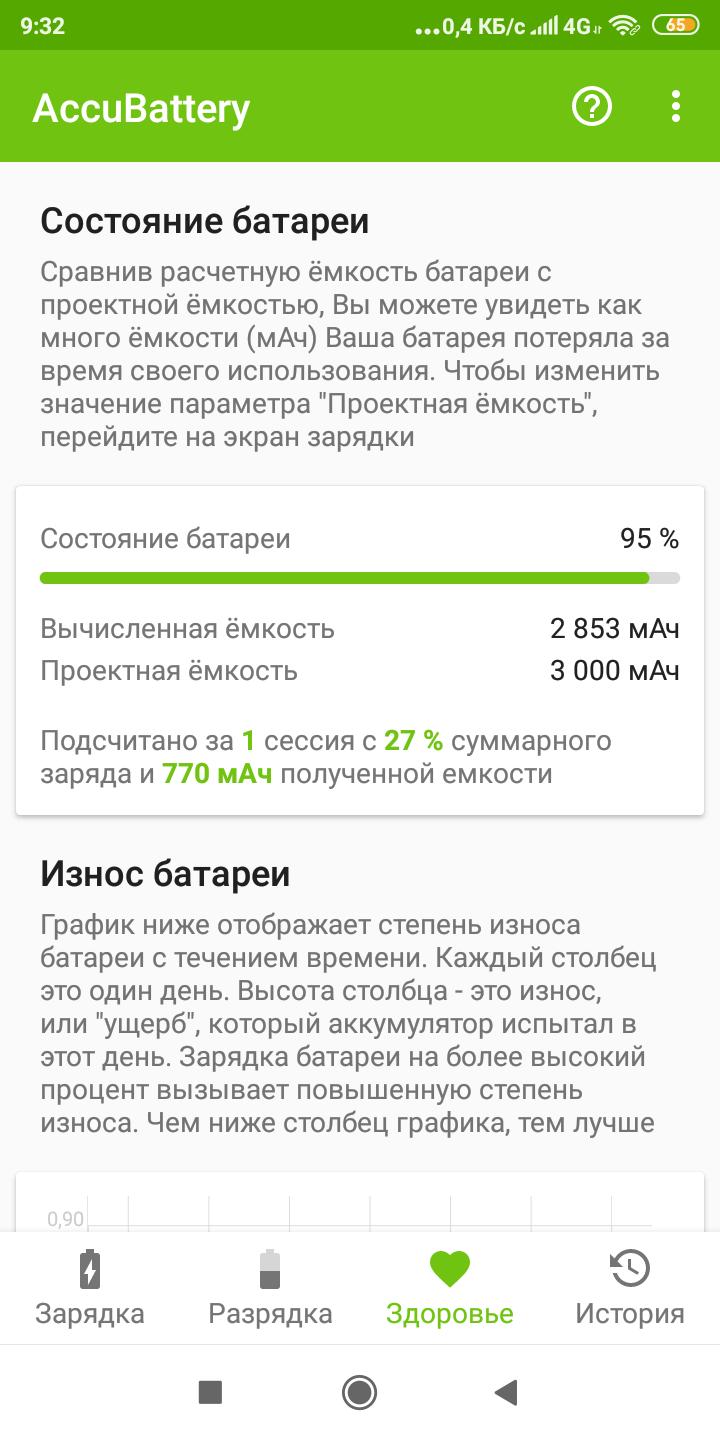
Once you have determined the wear and tear on your battery, you can take steps to extend its life.
Working Internet
Having the internet on significantly drains battery power. This often happens because the user forgets to turn it off. Many people don't turn it off at all. As a result, this type of connection consumes a colossal amount of energy.
Low battery capacity
Currently, smartphones with high and low capacities are available. A battery size of 2000–3000 mAh is considered standard. Anything higher is already a fairly large energy capacity.
Due to the low capacity of the battery, it drains energy quickly, leaving the smartphone user without a connection after a couple of hours. Therefore, always buy phones with a battery that capacityIt won't be lower than 2500 mAh, but it's better if it's higher.
Low quality battery
Some phones may have a low-quality battery. Or the capacity stated on the packaging may be several times higher than the actual capacity. Avoid purchasing smartphones in questionable places, such as markets and underground passages. It's best to go to reputable and trusted stores. This will significantly reduce the risk of buying a counterfeit.
How to save battery life on Android?
In order to increase, that is, save battery life of a smartphone with the Android operating system, you should follow a number of rules specified in this section.
To optimize your Android battery life, follow these tips:
- Install one of the battery saving programs.
- Find out which app is using a lot of battery and disable it or use it less often.
- Turn off Wi-Fi, GPS, Internet or reduce their use.
- Don't let the battery drain completely. Lithium-ion batteries don't handle this well.
- Never use the battery in freezing or hot conditions. Ideally, the operating temperature should be between 20 and 25 degrees Celsius.
- Avoid charging your phone frequently with wireless power adapters as they heat up the battery.
- You should always store a lithium-ion battery at 30-50% charge. If it's completely discharged, reviving it after a long period of time will be extremely difficult.
- Reduce screen brightness.
- Uninstall apps you don't use.
While it's better to have an app monitor your Android's battery charge, extending your battery life will be much more effective with your help.
Thus, by following these rules, it will be very easy for you to save battery power on Android.
Which smartphone has the longest battery life?
We all want our phones to last as long as possible on a single charge. But most often, the battery dies after 12 hours. There are reasons for this, as discussed above.
The champion in autonomy is the smartphone that has the largest battery capacity, for example, 5000–6000 mAh, etc. The higher the battery, the longer it will last without recharging. But don't forget about apps that drain your battery and other things.
Battery indicator
Not every user has access to the energy level widget, which is a battery level bar on the smartphone screen.
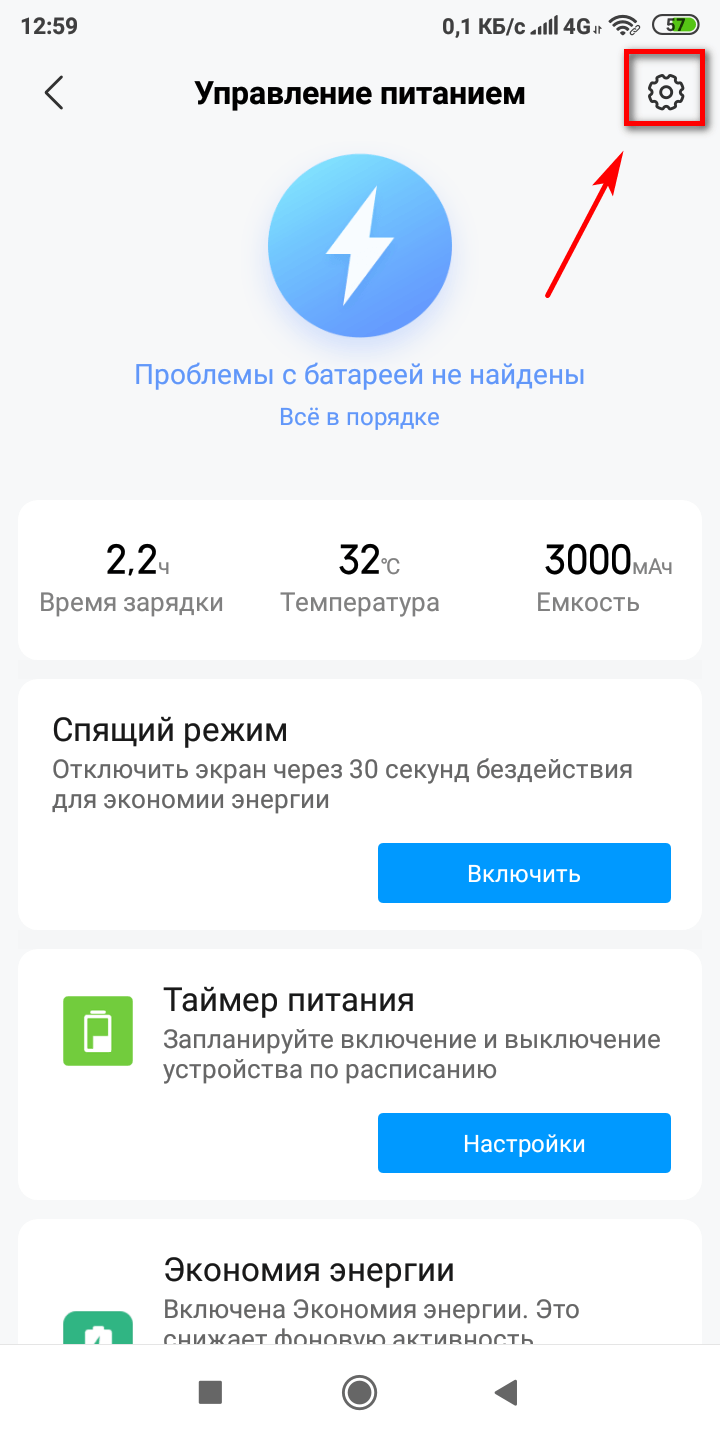
Displaying the battery charge on an Android device can often be problematic, but here's a step-by-step guide on how to do it. All data and screenshots are based on a Xiaomi Redmi 6A phone.
- Go to your smartphone settings.
- Click Power & Performance.
- Click on the gear icon.
- Click on the battery indicator.
- Select the desired widget. There are three options: a graphic widget, a percentage widget, and a bar at the top of the screen.
No. 1.
№2.
№3.
No. 4.
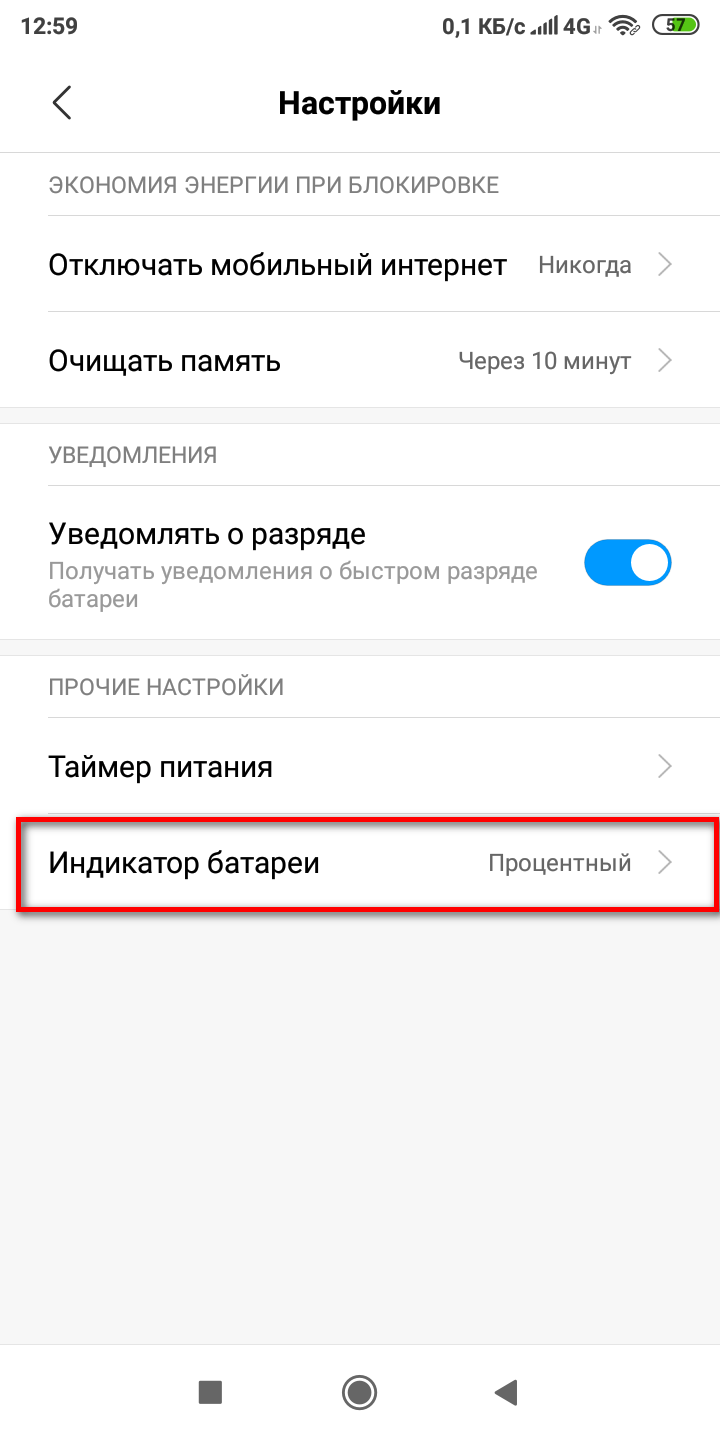
No. 5.
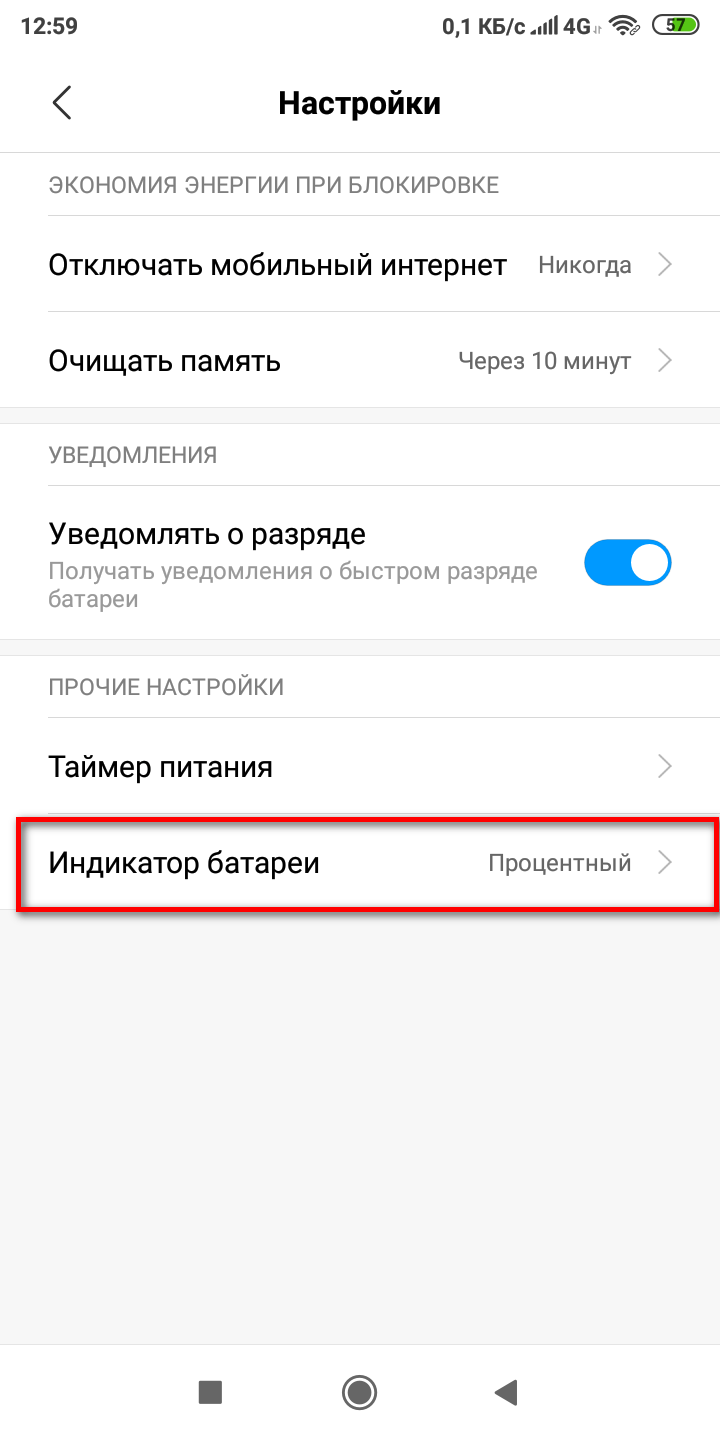
Once you select the percentage indicator, the battery level for Android will be displayed in numbers.
How to charge a new smartphone battery?
As we know, the lifespan of a smartphone battery depends on its proper charging. Sometimes, due to improper charging, a smartphone may display an incorrect battery charge, which is unfortunate.
Below are instructions on how to properly charge a new lithium-ion battery on a smartphone.
Instructions
To extend battery life, it's recommended to alternate between full and partial charges. For example, charge the battery to 100% once, then to 90% again. This method extends the life of your smartphone's battery.
However, according to some reports, you shouldn't charge your phone to 100%; it's best to charge it to 80%. Also, don't let it discharge to 40%. This will extend its lifespan. Lithium-ion batteries don't have a memory effect, so charging from 50% won't cause any problems.
You can read the article about how it is done calibration smartphone battery. This process also promotes better battery performance.
How to charge a smartphone with an AA battery?
There are two ways to do this:
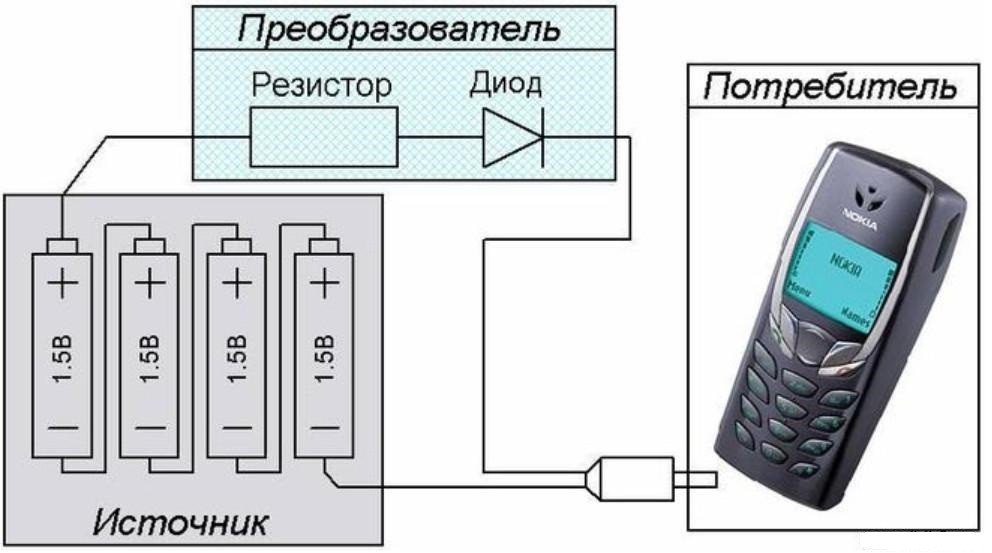
- Buy a special adapter for 1-2 batteries. These are usually sold on AliExpress or at the market.
- Make the device yourself using the diagram below.
A smartphone charger from batteries can be used in extreme cases. Alkaline and salineThe batteries are not very reliable and will only be able to release a small portion of their charge.
A video on how to charge a smartphone with a battery
The smartphone turns off when the battery is fully charged.
Some phones shut down after reaching 100%. This isn't a serious issue, but it's still inconvenient. Figuring out why this happens can be difficult. Sometimes, the shutdown occurs after connecting the power adapter.
There are a number of reasons why a smartphone turns off even when the battery is fully charged:
- A hardware failure in the Android system caused by the phone being dropped or hit.
- A bad battery. For example, the contacts may be dirty, the battery may be damaged, or the battery may be so old that it causes the phone to shut down. A swollen battery can also cause problems.
- The reason for the shutdown may be a malfunction of the charging unit.
- Firmware corruption due to a system failure. This can occur due to viruses or installation of programs from unprotected sources.
- If your Android device displays battery charge incorrectly, it could indicate damage to the internal modules. It's impossible to determine the specific cause of the problem on your own, so you'll need to contact a specialist.
- The charging port may be damaged. Dirt, debris, or something else may get into this opening, which can result in poor contact. The worst case scenario is if the phone was dropped and the port was damaged.
- The power controller may malfunction due to moisture ingress. This can happen when you move your phone from a cold place to a warm room. This can cause oxidation on the contacts, preventing current flow.
- Check the lock button, which is responsible for turning the phone on and off. It may be faulty and causing the smartphone to shut down unexpectedly.
What is the battery life of a smartphone?
Recently, mobile devices have been using Li-ion and Li-ion batteries with varying capacities. As is well known, battery energy capacity decreases by 10-20% every year. However, it's important to consider the number of charge and discharge cycles. Typically, a smartphone battery fails after 900 cycles. Manufacturers provide a one-year warranty. Phones with original batteries can easily last 3-6.5 years. A Nokia 1208 battery can last at least six and a half years. To prolong battery life, don't discharge it below 30-40%.