Battery Doctor is specialized software that allows you to monitor your battery's performance. The app is free and will help you conserve battery power and extend the life of your phone.
Features of the Battery Doctor program
There are a number of basic functions that this software product can perform.
- Built-in 3 cycles allow you to extend battery life.
- Notifies the user about the battery life under certain conditions, such as when the internet is turned on or listening to music.
- Shows information about your phone and installed applications.
- Shows exactly how long the smartphone will work on the current charge.
- Battery Doctor for Android optimizes device performance and speeds it up.
- Increases battery performance.
- Disables power-hungry software using the Task Killer feature. Shutdowns occur when programs are not in use.
- Built-in widgets carefully analyze everything that happens on your phone and create conditions that will reduce battery consumption.
- If you disable Bluetooth or Wi-Fi, the battery doctor will show how much longer your gadget's operating time will be.
Peculiarities
- Clear interface.
- Built-in 28 languages.
- A noticeable link that, when tapped, will immediately close all unfinished tasks.
- Simple screen backlight controller.
- Shows the battery temperature.
- Provides advice on proper charging.
- There is a switch for changing Bluetooth Wi-Fi modes and others.
- Several power saving modes are built in: Work, Study, Sleep.
- If the screen is turned off, all unnecessary programs will close.
Battery protection
In addition to the above features, Battery Doctor can also provide charging advice, including how to charge properly and when. It will also teach you how to extend the lifespan of your battery.
Thanks to the three-stage system, you'll never have to overcharge your device. It'll keep everything under control without any hassle. A couple of clicks and all power consumption is noticeably reduced.
Installing the Battery Doctor app
To install the app on your Android, simply search online for "download Battery Doctor." A number of websites will appear that offer the app. However, it's best to download it from the Play Market. It's completely free and available in Russian. However, if you need a different version, you can easily change it.
After downloading the APK file, click it a few times and allow the installation. After that, it will work. If nothing happens, click the shortcut a couple of times to launch it. Then you can review the settings and adjust them to your liking.
Once you do all this, your mobile's battery will be under control and energy consumption will be noticeably reduced.
About the battery doctor's filling
So, the app weighs only about 5 megabytes and therefore won't take up much space on your Android. Its popularity is off the charts—it's already been downloaded by over 50 million people. Its average rating is 4.5 stars.
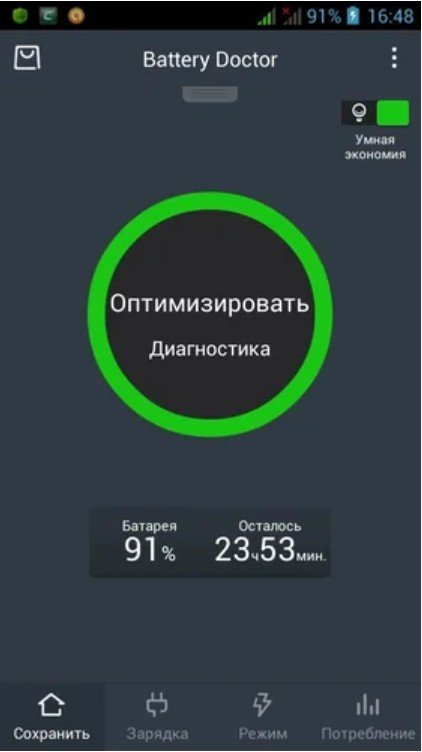
The interface has four tabs at the bottom: Save, Charge, Mode, and Power Consumption. On the left, there's a shortcut that lets you view top apps, if you need them.
You've probably noticed a tab called "Battery Doctor." Pulling it takes you directly to important switches. To access them, simply swipe the tab. Here they are:
- Volume
- Wi-Fi.
- Vibration,
- Screen backlight delay and Flight mode.
- Data transfer (Internet access).
- Screen brightness.
- GPS